Help Center
This is a simple hero unit, a simple jumbotron-style component for calling extra attention to featured content or information.
Getting Started
Before you start, you’ll need the following:
- A computer dedicated to SAM Broadcaster
- A CD-ROM drive
- CD ripper software to import CD tracks into your hard drive
- A solid Internet connection (minimum 48 kbps)
- A stream hosting server
We also recommend having the following items:
- Audio recording and editing software
- At least 1 microphone
- An audio mixer
- Audio gear like an equalizer, a compress0r, and so forth
Recommended reading:
Depending on the size of your station, we recommend starting with a small streaming package and increasing your speed and scale as your listenership grows. SpacialNet stream hosting can support between 20 and 2,500 concurrent listeners per server. If you think you will require more capacity, please contact Spacial Support to set up a tailored streaming solution.
Follow these steps to set up your stream hosting account:
- On the SpacialNet homepage, locate the Quick Quote widget.
- Select the server type you want, either SHOUTcast or Windows Media.
- Select the maximum bitrate to determine the quality of your stream.
- Make sure your bandwidth can support your streaming bitrate. The combined bitrate of all your streams should never exceed 80% of the value of the upload speed reported by speedtest.net.
- Select “Maximum Concurrent Listeners” from the drop-down menu.
- Click “Calculate.”
- After reading them carefully, check the “Terms & Conditions” box.
- Click “Continue” when you’ve reached a suitable total monthly cost.
If you are an existing SpacialNet member, log into the User Zone. If you are not an existing SpacialNet member, please create a Profile in the User Zone. Make sure all the required fields of the form are filled out.
Once you’re logged into the User Zone, you’ll be asked to select your preferred payment method to purchase SpacialNet’s streaming service. The available payment methods include PayPal and credit card. You will then be asked to subscribe to a monthly payment plan for your streaming service.
From the User Zone, you will also be asked to set up your radio station information. You can change your station’s information anytime. From this page, follow these steps:
- Click on “+ Add Station.”
- Enter your station’s name, using a maximum of 10 characters.
- Click “Continue.”
- Select “Use AudioRealm pop-up player.”
- Read the Terms & Conditions carefully and click “Accept.”
Recommended reading:
- Before Your Install SAM Broadcaster
- How to Install SAM Broadcaster with Firebird
- How to Install SAM Broadcaster with MS SQL
- How to Install SAM Broadcaster with MySQL
- How to Set Up Your Windows Media (WMA) Encoder
- How to Set Up Your Windows Media Statistic Relays
- How to Set Up your SHOUTcast Statistic Relays
Live streaming allows your listeners to hear you audio content in real-time, as soon as you broadcast it. Live streaming is available for both SHOUTcast and Windows Media (WMA) online radio directories.
Go to the User Zone to set up a live streaming account.
SpacialNet allows you to stream your audio in popular formats like MP3, Windows Media (WMA) and aacPlus. MP3 is one of the oldest streaming formats, WMA works well with Windows Media Player and Microsoft Silverlight, while aacPlus provides the best sound quality at lower bitrates.
Once you’ve chosen the format you’d like to stream in, you can set up your SpacialNet encoder. To do this, open SAM Broadcaster and follow these steps:
- Click on “Desktop B” in the toolbar.
- In the “Encoders” window, click the plus sign (“+”) to add a new encoder.
- Select the SpacialNet encoder.
- Click “OK.”
The SpacialNet encoder window will then appear.
- In the “Service” tab, enter your SpacialNet username and password.
- Click “Login.”
- A list of active services will appear. Click the “Select” button next to the service you wish to use.
- Click “Next” to proceed to the “Encoder” tab and verify your settings.
- Click “Next” to proceed to “Station Details.”
In “Station Details”:
- Enter your radio station’s name.
- Select your station’s genre from the drop-down menu.
-
Provide your website’s URL.
- Note that the “AIM,” “ICQ,” and “IRC channel” fields are optional. If you have already provided your station details under “Config” in “Station Details,” the information will already be filled in.
- Click “Next” to proceed to the “Archive” tab.
In the “Archive” tab:
- Check “Save stream to file” if you want to save a copy of your stream to your local hard drive.
Once you’ve configured all your settings, click “OK” to close the SpacialNet Encoder window.
Recommended reading:
SpacialNet allows you to stream your audio in popular formats like MP3, Windows Media (WMA) and aacPlus. MP3 is one of the oldest streaming formats, WMA works well with Windows Media Player and Microsoft Silverlight, while aacPlus provides the best sound quality at lower bitrates.
Once you’ve chosen the format you’d like to stream in, you can set up your SpacialNet encoder. To do this, open SAM Cast and follow these steps:
- Click on the “Encoders” button at the bottom.
- In the “Encoders” window, click the plus sign (“+”) to add a new encoder.
- Select the SpacialNet encoder.
- Click “OK.”
The SpacialNet encoder window will then appear.
- In the “Service” tab, enter your SpacialNet username and password.
- Click “Login.”
- A list of active services will appear. Click the “Select” button next to the service you wish to use.
- Click “Next” to proceed to the “Encoder” tab and verify your settings.
- Click “Next” to proceed to “Station Details.”
In “Station Details”:
- Enter your radio station’s name.
- Select your station’s genre from the drop-down menu.
-
Provide your website’s URL.
- Note that the “AIM,” “ICQ,” and “IRC channel” fields are optional. If you have already provided your station details under “Config” in “Station Details,” the information will already be filled in.
- Click “Next” to proceed to the “Archive” tab.
In the “Archive” tab:
- Check “Save stream to file” if you want to save a copy of your stream to your local hard drive.
Once you’ve configured all your settings, click “OK” to close the SpacialNet Encoder window.
Recommended reading:
Setting up a statistic relay will let you know how many listeners are tuned in at any given time.
To set up SpacialNet statistic relays, open SAM Broadcaster and follow these steps:
- Click on “Desktop B” in the toolbar.
- In the “Statistics” window, click the plus sign (“+”) to add a new relay.
- Select “SpacialNet Relay” from the list.
- Click “OK.”
The “SpacialNet Relay” window will appear.
- In the “Service” tab, enter your SpacialNet username and password.
- Click “Login” and select a streaming service.
- To select the "Color on graph," click on the color box, and a color selection window will appear. In it, select the color you want to use to represent this particular statistic on your relays graph.
- We recommend leaving "Private statistic relay" unchecked, since "Public" relays get listed on AudioRealm.com.
- Click "OK."
Recommended reading:
Setting up a statistic relay will let you know how many listeners are tuned in at any given time.
To set up SpacialNet statistic relays, open SAM Cast and follow these steps:
- Click on the “Statistics” button at the bottom center.
- In the “Statistics” window, click the plus sign (“+”) to add a new relay.
- Select “SpacialNet Relay” from the list.
- Click “OK.”
The “SpacialNet Relay” window will appear.
- In the “Service” tab, enter your SpacialNet username and password.
- Click “Login” and select a streaming service.
- To select the "Color on graph," click on the color box, and a color selection window will appear. In it, select the color you want to use to represent this particular statistic on your relays graph.
- We recommend leaving "Private statistic relay" unchecked, since "Public" relays get listed on AudioRealm.com.
- Click "OK."
Your SpacialNet relay is now configured. It may take a minute before statistics appear on the graph.
Recommended reading:
Note: Microsoft Expression Encoder is available as a free download from Microsoft. Before installing Expression Encoder, you will also need to download and install the Microsoft .NET Framework Runtime 4.0.
Setting up your Windows Media Server
Note: If you do not have a Windows Media server on SpacialNet, skip this section.
Windows Media with Microsoft Expression Encoder works in push (recommended) or pull mode. For push distribution, the encoder connects to your server to deliver the broadcast. For pull distribution, Windows Media Server will actually connect to your system. In order to use pull distribution, the server must know where to find you. Keep that in mind when setting up your stream.
Configure your Windows Media Server Account
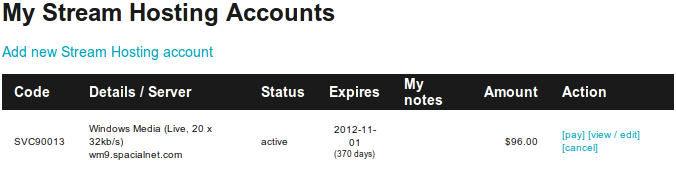
To configure your stream host account go to: https://spacialnet.com/broadcasters/streamhost.list.html
-
Login to your Account (If Necessary)
-
Click on "Edit" next to your Stream
Push Distribution
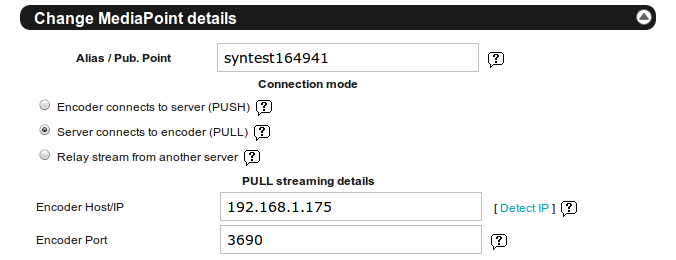
The quickest way to set up your stream would be with Push Distribution. To make setup as painless as possible, use this option if possible. From your Windows Media Stream host account:
- Select 'Encoder connects to server (PUSH)'
- Click 'Update MediaPoint settings'
Pull Distribution
This type of setup takes more time and effort. If you choose to have a Push Distribution, please skip this option.
- Select 'Server connects to encoder (PULL)'
- Enter in your IP address or DNS Host
- Enter Port '3690' if it isn't there already
To find out your current IP, click on the 'Detect IP' link on the side of the page or visit https://spacialnet.com/broadcasters/tools.ip.html . Click update to push changes to server.
Note: If your IP address changes often, get a static DNS name from http://www.no-ip.com or http://www.dyndns.com
You might also need to open the Port in your firewall, or "port forward" the port in your router. Once your encoder is running go and visit our port tester at https://spacialnet.com/broadcasters/tools.port.html . From there you can check to see if port 3690 is available.
If our test shows this port as closed then you are most likely behind a firewall/router/nat and it will need to be configured with a port forward for TCP on port 3690 to your internal IP address of the encoder.
Setting up Windows Expression Encoder
To set up Microsoft Expression Encoder with your SpacialNet Windows Media stream hosting account:
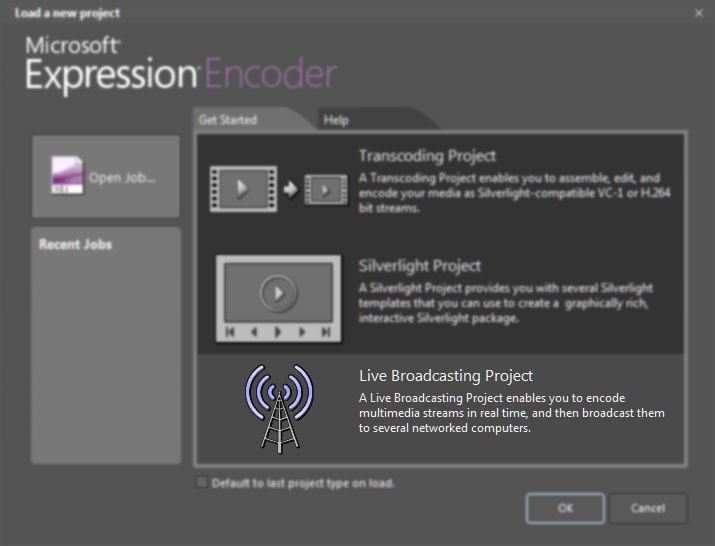
- Open Expression Encoder
-
Select Live Broadcasting Project from the start up window.
- Select a live or a file input from the left hand panel (see Microsoft documentation for details)
- Select the output tab on the right hand panel.
-
For push distribution
-
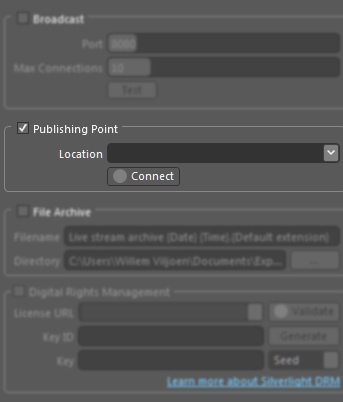
Tick the publishing point check box.
-
Enter the details for your streaming account in the Location field, using the following format:
http://yourserver.spacialnet.com:port/alias
Note: The port is the actual Windows Media Server port, not the statistics relay port for your account. For almost all streaming accounts, this will be port 80. -
Click the Connect button to test the connection. A separate window should now appear, requesting your username and password. Enter the username and password for your stream.
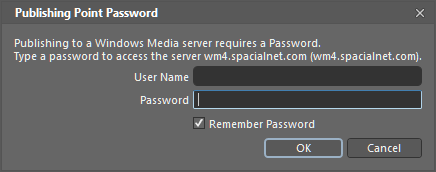
- Check the Remember Password box and click OK.
- If you have entered your details correctly, the connect button will change to green and Connected will be displayed to the right.
-
Tick the publishing point check box.
-
For pull distribution
-
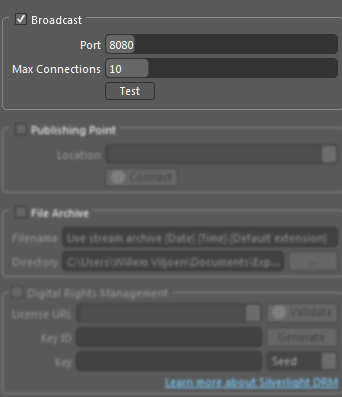
Tick the broadcast check box.
-
Choose a port number for the broadcast. Make sure that this port is not being used by any other software or streams on your system.
Important: If you are behind a firewall or address translator, please ensure that the port is open and traffic sent to it can reach your system. - Choose the maximum number of connections. If you are using multiple servers to relay your stream, you should set this value high enough that each server can connect, while still leaving one open slot for yourself to allow you to test your stream. Please note that more connections will require more bandwidth. Be careful not to allow so many connections that streaming to your Windows Media Server degrades.
-
Tick the broadcast check box.
-
Click Start in the center panel.

You should now be broadcasting on your Windows Media streaming account.
Before going live, you should listen to your online radio station to make sure all the sounds are streaming correctly.
On SHOUTcast.com*
Note that this method will not work with Windows Media radio stations. To listen to your station on SHOUTcast.com:
- When setting up your encoder, make sure you check “List station on SHOUTcast.com.”
- Also make sure your encoder is running and that your station is playing.
- Visit SHOUTcast.com.
- Enter your station name in the search box.
- Wait for the search engine to locate your radio station.
- Click on the “Listen” link next to your station.
You can now listen to your online radio station.
On AudioRealm.com
Note that this method will work with both Windows Media and SHOUTcast radio stations. To listen to your station on AudioRealm.com:
- Make sure you have followed these steps to ensure that you are listed on AudioRealm.
- Visit AudioRealm.
- Enter your station name in the search box.
- Wait for the search engine to locate your radio station.
- Click on “Play.”
You can now listen to your online radio station.
Alternatively, you can locate your AudioRealm station ID by going to SAM>Config>Station Details. In the “Short name” drop-down menu, there will be a number just before the short name. This is your SpacialNet station ID. You can access your station page on AudioRealm by simply typing it into your browser as follows:
http://audiorealm.com/play/stationID/MyStationName
Example: http://audiorealm.com/play/61540/1.FM
On SpacialNet.com
Note that this method will work with both Windows Media and SHOUTcast radio stations. To listen to your SHOUTcast station on the SpacialNet “Listen” link:
- Log into SpacialNet with your username and password.
- Click on “Edit/View” in your SHOUTcast service.
-
Click on “Listen Link.”
- Note that this may require a Winamp or VLC player.
You can now listen to your online radio station.
Recommended reading:
Listing your online radio station on AudioRealm.com has many advantages. It provides additional listener statistics, extra exposure, not to mention a webpage where people can listen to your online radio player. Follow these steps to list your online radio station on AudioRealm.
Get a Free SpacialNet Account
Go to SpacialNet.com and sign up for a free account. Once you've done that, log into SpacialNet.
Create a Station on SpacialNet
- In your SpacialNet profile, click on "My stations" from the left column, then click on "Add Station."
- Type in a short name for your station for now; you'll be able to type in a longer name later.
- Determine how people will listen to your station on AudioRealm.com. We recommend the "Use AudioRealm embedded player" method.
- Click "Accept" to save your station settings.
Upload a Station Logo (Optional)
You can upload a station logo for your station so that people can see it on the player and recognize your station. The logo must be in 120x60 pixel format. Under Station Administration > Personalize, click on "Station Logo" and follow the instructions to upload your logo.
Set Up Your Software
To list your online radio station on AudioRealm, you need to use compatible software. We recommend SAM Broadcaster or SAM Cast, which you can download on Spacial.com.
Configure your SAM software as follows:
- Locate and click on the "Config" button.
- Go to the "Member details" section and enter your SpacialNet username and password.
- Go to the "Station details" section, click on the "Short name" dropdown and select the station you created earlier. Then fill out the rest of the fields in this window.
- Go to the "Statistic relays" section. Set up your statistic relays so that they'll point to your streaming servers. Your station cannot be listed on AudioRealm unless you have at least one active statistic relay.
- Click "OK" to store your settings.
Verify
Go to AudioRealm.com and type your station's name into the search box. It should come up.
That said, it may take a few minutes before your station is listed on AudioRealm. If you're using SAM Broadcaster, keep an eye on the event log. It'll read "Touch OK" if the AudioRealm listing worked. If it didn't, an error message will appear and tell you what to do to next.
Recommended reading:
To sign up for our free trial, go to the SpacialNet homepage and enter your name and email address in the Free Streaming Trial box. Once you sign up, you'll receive an email with the details you need to set up your encoders, so keep that message handy. If you don't have your own encoder software, download SAM Broadcaster or SpaciSAM CastalNet for free for 14 days.
The free streaming trial is available for 24 hours on limited servers. If all the free streaming slots are occupied, try again a little later.
How to Set Up Your Encoders
The simplest method is to use the "SpacialNet" encoder for SAM Broadcaster or SpaciSAM CastalNet.
- In the "Encoders" window, click the plus sign ("+") to add a new encoder.
- Select the SpacialNet encoder.
- Click "OK."
- Now fill in the SpacialNet username and password in the trial email you received.
- Click "OK."
The selected encoder window will then appear. In the "Converter" tab:
- Set your "Bitrate" under "Setting." For a good cost/quality ratio, we recommend 64 kbps for testing purposes.
- Set your "Mode" under "Setting." For bitrates higher than 48 kbps, select "Stereo." For bitrates lower than 48 kbps, select "Mono."
- There are several "Sampling rate" options to choose from. Selecting "Auto" means the encoder will automatically select the best sampling rate for your chosen bitrate.
- Under "General options," check "Auto start encoder after" if you want the encoder to start automatically each time you launch SAM Broadcaster OR SAM Cast.
- Under "General options," leave "Auto reconnect encoder after" checked so SAM Broadcaster or SAM Cast can recover from network errors.
All you need to do now is to press the "Play" button on the encoders window to start encoding. To listen to your station follow the "Listen" link provided in your free trial email.
Recommended reading:
Tips & Tricks
Both radio directories have their pros and cons. When choosing an online radio directory, consider things like bitrate and audio formats.
SHOUTcast has the following features:
- Supports MP3 and aacPlus 2
- Supports Nullsoft Video streaming
- Can be played on Windows, Mac and Linux operating systems using programs like WinAmp, Quicktime, iTunes, XXMS, RealPlayer and Windows Media Player
- Automatically lists your station in SHOUTcast’s radio directory
- Simple set-up
Windows Media has the following features:
- Supports the Windows Media format
- Can be played with Windows Media Player on both PC and Mac
- Supports Windows Media Video streaming
Windows Media has the following features:
- Supports the Windows Media format
- Can be played with Windows Media Player on both PC and Mac
- Supports Windows Media Video streaming
Recommended reading:
SpacialNet streaming services were specifically designed with Spacial software in mind. This means our stream-hosting services work best with SAM Broadcaster or SAM Cast. However, Spacial Support is knowledgeable in all manner of streaming software and can make solid recommendations
Recommended reading:
To achieve CD-quality audio on your stream, 128 kbps is recommended. For voice-only audio, the recommended minimum is 32 kbps.
Make sure your bandwidth can support your streaming bitrate. The combined bitrate of all your streams should never exceed 80% of the value of the upload speed reported by speedtest.net .
Recommended reading:
Troubleshooting
This issue is usually caused by incorrect encoder settings.
When SAM Broadcaster asks for your publishing point, remember that it’s the “Alias” you’re given in your control panel. For example, if your listen link is mms://wm11.spacialnet.com/demo, your settings would be as follows:
- Server/IP: http://wm11.spacialnet.com
- Publishing point: demo
Recommended reading:
This issue is usually caused when our server cannot connect to your encoder. Most of the time, it’s due to your firewall or port settings. To find out how to configure your router’s port forwarding, please visit portforward.com
If your ports are open but you still can’t broadcast, then your firewall is also blocking your ports. To verify this, please use our Port Tester and Broadcasting Tools: http://spacialnet.com/broadcasters/tools.port.html
We also recommend referring to your firewall’s manual for instructions on how to open a port.
Recommended reading: